Snapdown is a productivity and developer tool designed for macOS that transforms any snippet of your Mac screen into structured, clean Markdown text. Created by builder and full-stack engineer Broden Suffern, the application aims to streamline documentation and note-taking workflows for Mac users.
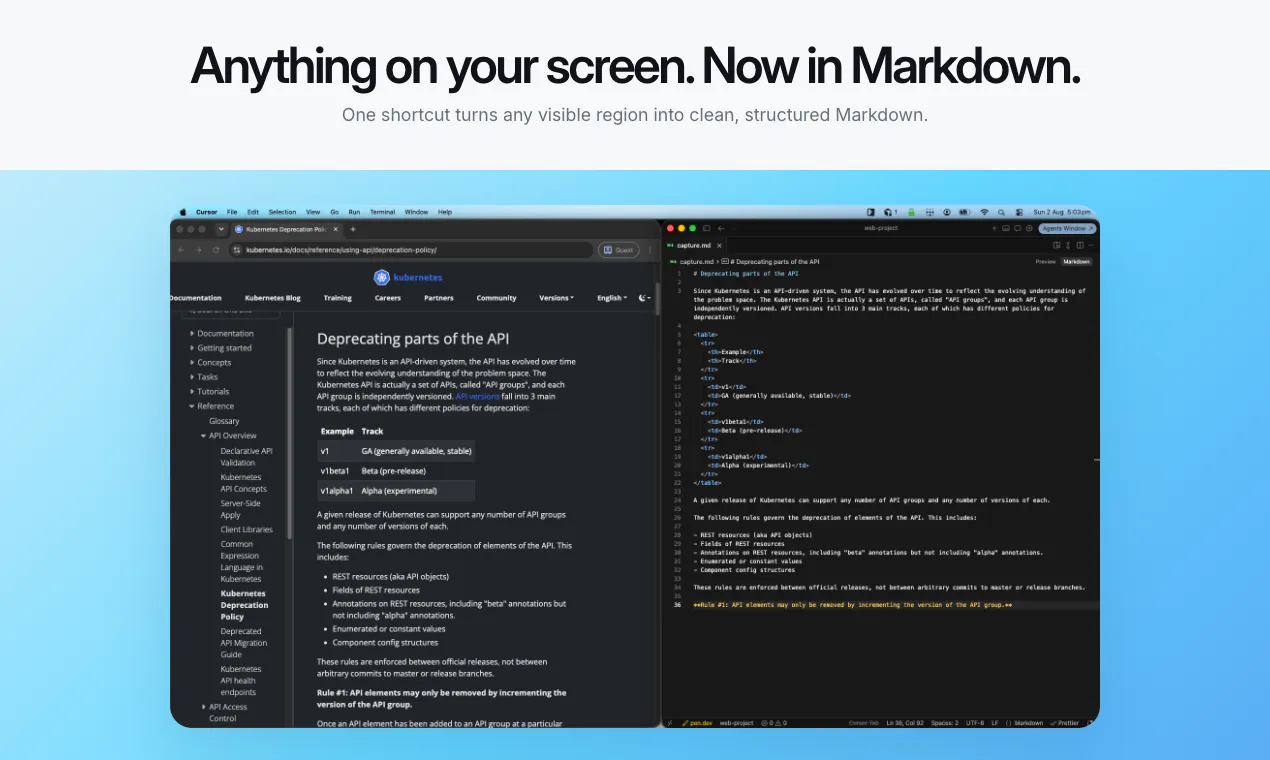
Unlike traditional Optical Character Recognition (OCR) tools that flatten visual content into plain, unformatted text blocks, Snapdown captures the underlying layout of your content. It intelligently recognizes and preserves structural elements such as headings, ordered and unordered lists, and tables.
Designed for speed and privacy, Snapdown operates with a simple workflow: capture any section of your screen using a single keyboard shortcut and instantly paste the structured Markdown wherever you need it. Additionally, all processing runs locally on Apple silicon, keeping your screenshots and data private on your machine.
Snapdown is a Mac screen capture utility that converts visual content on your screen directly into clean, structured Markdown text.
Traditional OCR flattens text into plain strings. Snapdown preserves formatting and document structure, recognizing headings, lists, tables, and formatted text.
Yes, Snapdown keeps every screenshot local on your Mac, processing text locally using Apple silicon.
You can capture any part of your Mac screen using a single keyboard shortcut and paste the resulting Markdown anywhere.
0 community reviews for Snapdown
Help the community by sharing your experience. Your review helps others make better decisions.