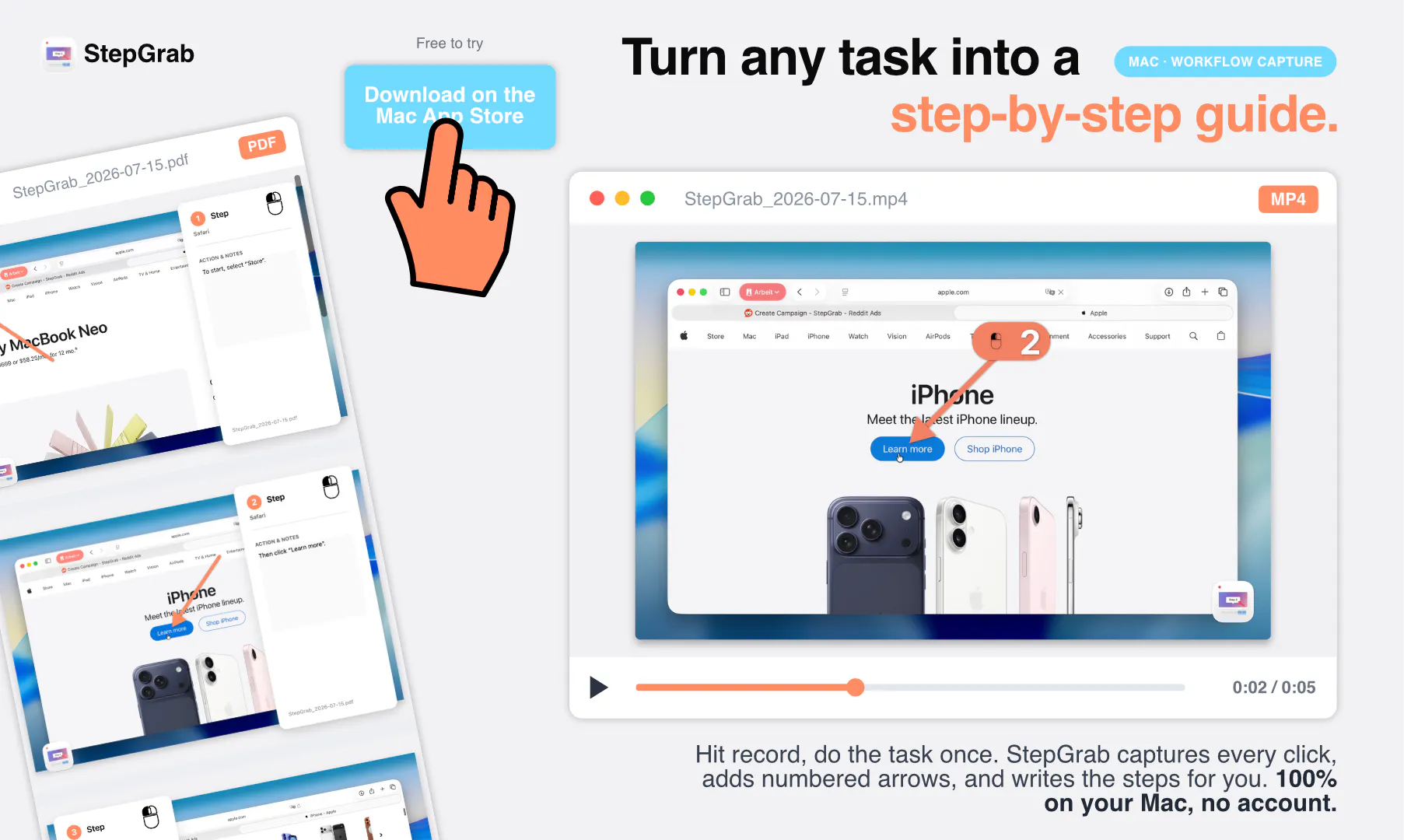
Documenting software workflows and tutorials typically involves a tedious cycle of taking screenshots, cropping images, drawing arrows, and typing out instructions step by step. StepGrab is a native Mac menu bar app designed to automate this entire process, turning any Mac task into a comprehensive step-by-step guide instantly.
Built as an on-device utility, StepGrab requires no account and ensures nothing is uploaded to the cloud, prioritizing your privacy. Users simply hit record, execute the task once, and the app automatically converts every click into an annotated screenshot alongside pre-written text descriptions. Furthermore, it supports flexible exporting options including GIF, PDF, MP4, clickable HTML, Markdown, and vertical video, allowing you to tailor your guides with custom brand colors from a single recording.
StepGrab is a native Mac menu bar application that turns any task on your Mac into a step-by-step guide by automatically capturing screenshots and writing instructions with every click you make.
No account is required, and the app operates entirely on-device with nothing uploaded to the cloud.
You can export your completed recordings as GIFs, PDFs, MP4s, clickable HTML, Markdown, or vertical videos.
StepGrab offers a real free tier alongside a Pro version available for $2.99 per month, $12.99 per year, or a one-time purchase of $44.99.
0 community reviews for StepGrab
Help the community by sharing your experience. Your review helps others make better decisions.

Founder and Dev of StepGrab.