
Tag Your Photos vs IncreaseImages
Comprehensive feature analysis, ratings breakdown, platform compatibility, and community review comparison.
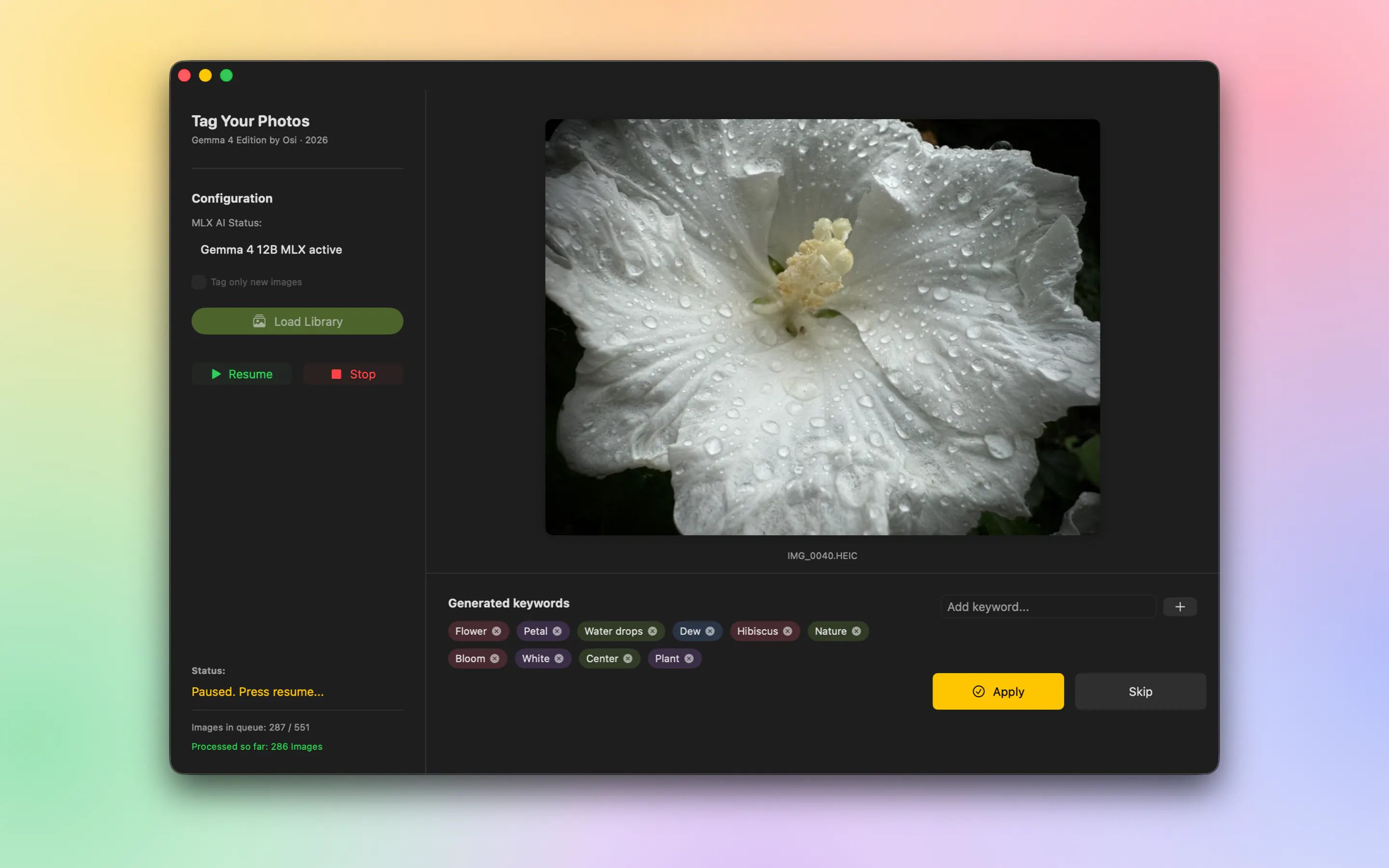
Tag Your Photos
AI-powered keywords for Apple Photos, 100% on your Mac
Detailed Feature Comparison Matrix
Compare Other Tools| Dimension | Tag Your Photos |  IncreaseImages IncreaseImages |
|---|---|---|
| Primary Category | Photography | Photography |
| Community Rating | No ratings(0 reviews) | No ratings(0 reviews) |
| Community Upvotes | 92 votes | 10 votes |
| Supported Platforms | Web | Web |
| Tags & Focus | #Artificial Intelligence#Apple#Photography | #Photography |
| Maker / Company | Independent Developer | Independent Developer |
| Platform Verification | Community Listing | Community Listing |
About Tag Your Photos
Tag Your Photos is an AI-powered utility built specifically for Apple Photos on macOS. Developed by Maik David, it automatically generates search keywords for your image collection using on-device artificial intelligence, eliminating the need to manually tag your photo library.
Unlike many photo management tools that require uploading your private media to third-party cloud servers, Tag Your Photos runs 100% on-device on your Mac. Powered by the Gemma 4 12B model via Apple MLX framework, your photos remain completely private with zero external cloud uploads.
The application interacts directly with your existing Apple Photos library, meaning you do not have to export your photos or maintain duplicate media files. The generated keywords land directly in system-wide Spotlight search, enabling quick searching right from your iPhone or iPad home screen as well as on your Mac. Additionally, the underlying model is configured conservatively—it sticks to general descriptors when uncertain to avoid making falsely specific guesses.
Pros of Tag Your Photos
- 100% on-device AI processing via Apple MLX (Gemma 4 12B) with zero cloud uploads.
- Works directly on your Apple Photos library without exporting or creating duplicate files.
- Keywords sync to system-wide Spotlight search, accessible from Mac, iPhone, and iPad home screens.
- Avoids falsely specific guesses by staying general when the AI model is uncertain.
Cons of Tag Your Photos
- Requires a Mac to perform the on-device AI tagging processing.
- Processing speed depends on local Mac hardware capabilities for running AI models.
Frequently Asked Questions
Does Tag Your Photos upload images to external servers?
No. Tag Your Photos operates 100% on-device on your Mac using the Gemma 4 12B model via Apple MLX. No images are uploaded to the cloud.
Do I need to export my photos to use this tool?
No. The app works directly on your native Apple Photos library, so you do not need to export images or deal with duplicate files.
Can I search for these AI tags on my iPhone or iPad?
Yes. The keywords generated on your Mac integrate into system-wide Spotlight, allowing you to search for your photos directly from the home screen on iPhone and iPad.
How accurate are the AI keywords?
The AI model is programmed to remain general when it is unsure, preventing it from assigning falsely specific or inaccurate tags to your photos.
About IncreaseImages
IncreaseImages is a free, browser-local utility designed to help users efficiently resize JPEG, PNG, and WebP images. Whether you need to hit a specific file size (KB value or range), set exact pixel dimensions, or scale your images up to 4×, this tool offers a straightforward solution without the complications of traditional software.
Built with privacy at its core, IncreaseImages processes everything directly within your browser. No images are uploaded to an external server, ensuring your files remain strictly confidential. It requires no sign-up or registration, and it is important to note that it functions as a precise resizer rather than an AI upscaler.
Pros of IncreaseImages
- Processes images locally in your browser with zero server uploads for maximum privacy
- Allows resizing to a target KB value or range, as well as exact dimensions
- Supports scaling up to 4×
- Completely free to use with no account or sign-up required
Cons of IncreaseImages
- Not an AI upscaler, meaning it uses standard resizing methods rather than generative AI enhancement
- Limited to JPEG, PNG, and WebP formats based on available data
- Browser-based tool which may rely entirely on client-side processing performance
Frequently Asked Questions
Do I need to upload my images to a server?
No. IncreaseImages is a browser-local image resizer, meaning all processing happens directly in your browser without uploading your files to any external server.
Is IncreaseImages free to use?
Yes, it is a free tool that requires no sign-up or account creation.
What formats are supported?
IncreaseImages supports JPEG, PNG, and WebP image formats.
Is this tool an AI upscaler?
No, IncreaseImages is not an AI upscaler. It is designed to resize images to target KB sizes, exact dimensions, or scale up to 4× locally in your browser.