
witr vs LTH Shield
Comprehensive feature analysis, ratings breakdown, platform compatibility, and community review comparison.
Detailed Feature Comparison Matrix
Compare Other Tools| Dimension | 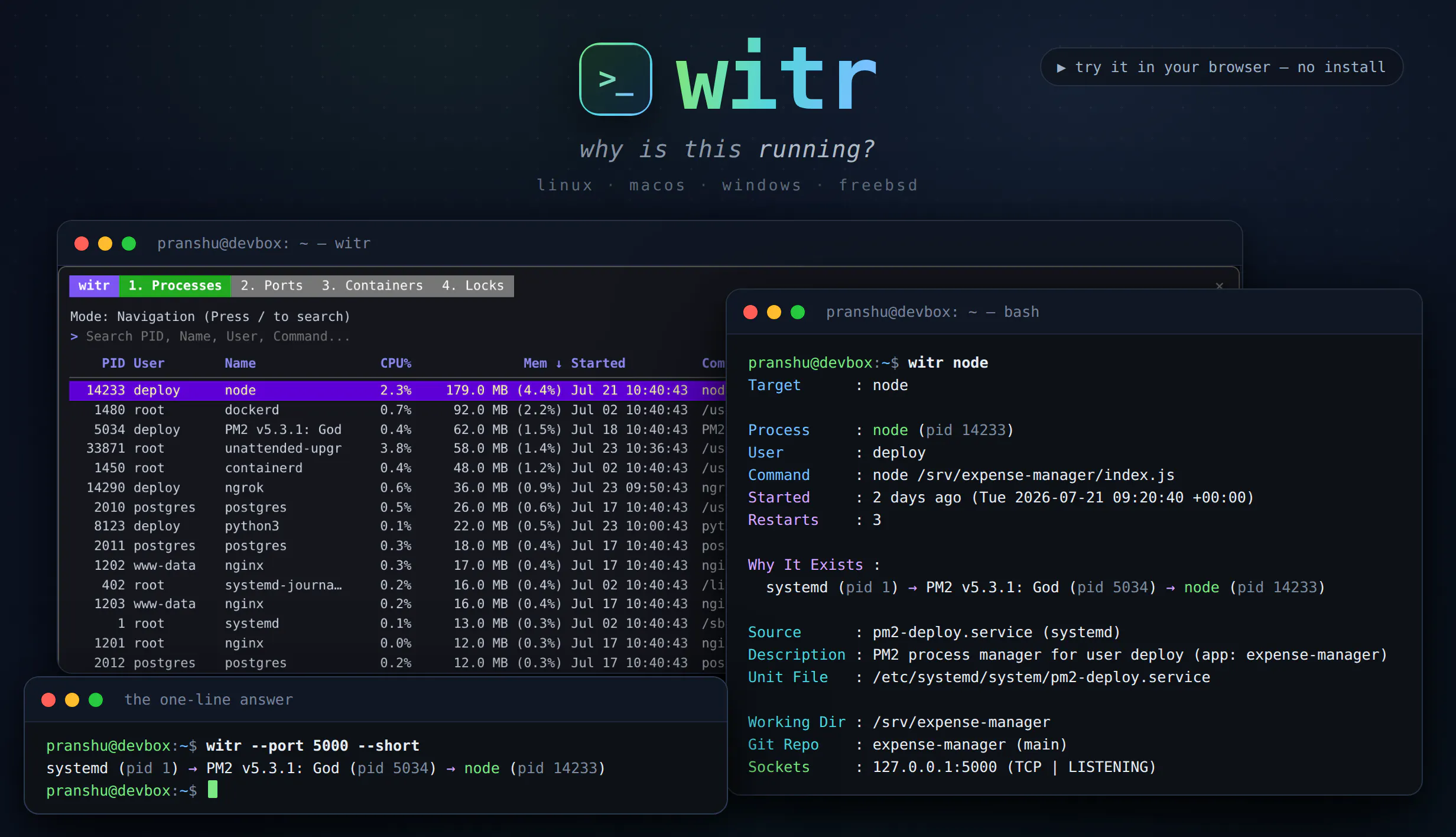 witr |  LTH Shield |
|---|---|---|
| Primary Category | Linux | Linux |
| Community Rating | 5.0(1 reviews) | No ratings(0 reviews) |
| Community Upvotes | 147 votes | 9 votes |
| Supported Platforms | Web | Web |
| Tags & Focus | #Developer Tools#Open Source#GitHub#Linux | #SaaS#Security#Linux |
| Maker / Company | Independent Developer | Independent Developer |
| Platform Verification | Community Listing | Community Listing |
About witr
Traditional system monitoring tools like ps, top, and lsof tell you what is currently running on your system, but they often leave you guessing about the context. witr (created by Pranshu Parmar) bridges this gap by telling you why a process, port, container, or file is running. By pointing it at any of these targets, witr traces the complete lineage and ancestry chain—explaining how it was spawned by systemd, supervisor, a shell, or cron, alongside details on who started it, when, from where, and any relevant warnings.
Designed for flexibility, witr can be run bare to launch an interactive TUI featuring dedicated tabs for Processes, Ports, Containers, and Locks. For automation and scripting, it supports flags like --short for a quick one-line chain and --json with real exit codes. Distributed as a single static Go binary, it is built to run smoothly across Linux, macOS, Windows, and BSD.
Pros of witr
- Traces the complete ancestry chain of processes, ports, containers, and files
- Interactive TUI mode with dedicated tabs for Processes, Ports, Containers, and Locks
- Script-friendly options including --short for one-line chains and --json output with real exit codes
- Distributed as a single static Go binary with cross-platform support (Linux, macOS, Windows, BSD)
- Open-source developer tool
Cons of witr
- Requires manual command-line execution or terminal interaction
- Cross-platform compatibility depends on underlying operating system support for specific inspectors (like containers or locks)
Frequently Asked Questions
What is witr?
witr is an open-source developer tool that traces the lineage and ancestry chain of a process, PID, port, container, or file to explain why it is running, who started it, when, and from where.
How do you use witr?
You can run witr bare to open an interactive TUI with Processes, Ports, Containers, and Locks tabs, or use command-line flags like --short for a one-line chain and --json for programmatic scripting.
What operating systems are supported?
witr is distributed as a single static Go binary supporting Linux, macOS, Windows, and BSD.
About LTH Shield
LTH Shield is an affordable Linux hardening and monitoring solution designed specifically for small teams and founders spinning up VPS boxes who need real protection without enterprise pricing or a dedicated SOC.
Built to address the wave of vibe-coded apps and modern deployments, LTH Shield provides comprehensive security features tailored for Ubuntu and Debian systems. With just one install command, users gain access to essential security tools including fail2ban, File Integrity Monitoring (FIM), system baselines, and optional Snort AI Intrusion Prevention System (IPS) capabilities.
The platform keeps heavy processing off your server by offloading learning and rule processing to LTH's servers, while maintaining user control directly through a centralized portal. It bridges the gap between basic server setup and costly enterprise EDR solutions like Falcon or Darktrace.
Pros of LTH Shield
- Affordable pricing tailored for small teams and founders rather than enterprise budgets
- Quick and easy setup with a single install command on Ubuntu/Debian
- Bundles essential security features like fail2ban, FIM, and baselines
- Optional Snort AI IPS with learning and rules handled on external servers and managed via a portal
Cons of LTH Shield
- Limited explicitly to Ubuntu and Debian operating systems in the current setup
- Not intended to be a full enterprise EDR replacement for large corporate environments
- Requires reliance on external servers for Snort AI IPS learning and rule processing
Frequently Asked Questions
What is LTH Shield?
LTH Shield is an affordable Linux hardening and monitoring solution designed for small teams and founders running VPS boxes who need real security without enterprise-level pricing.
How do you install LTH Shield?
You can set up LTH Shield on Ubuntu or Debian environments using a single install command.
What security features does LTH Shield include?
It provides fail2ban, File Integrity Monitoring (FIM), system baselines, and an optional Snort AI IPS where learning and rules are processed on LTH's servers and managed via a portal.
Who is LTH Shield built for?
It is built for small teams, independent founders, and creators spinning up VPS boxes who need solid protection without the high cost of tools like Falcon or Darktrace and without needing a SOC.