
Social Media Planning Tracker vs TestForge Agent Trials
Comprehensive feature analysis, ratings breakdown, platform compatibility, and community review comparison.
Social Media Planning Tracker
Plan it, schedule it, don't lose track of it
Detailed Feature Comparison Matrix
Compare Other Tools| Dimension | Social Media Planning Tracker |  TestForge Agent Trials |
|---|---|---|
| Primary Category | Productivity | Productivity |
| Community Rating | No ratings(0 reviews) | No ratings(0 reviews) |
| Community Upvotes | 5 votes | 5 votes |
| Supported Platforms | Web | Web |
| Tags & Focus | #Productivity#Social Media#Marketing | #Artificial Intelligence#Developer Tools#Productivity#OpenAI Day |
| Maker / Company | Independent Developer | Independent Developer |
| Platform Verification | Community Listing | Community Listing |
About Social Media Planning Tracker
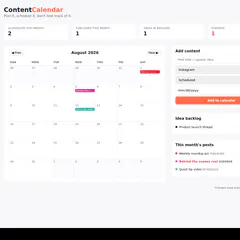
The Social Media Planning Tracker (created by UI/UX designer and digital product creator Sharmin Akter) is a streamlined, single-file social media planning tool designed to eliminate the clutter of traditional spreadsheets. Built around an actual monthly calendar view rather than a disguised grid, it gives marketers, creators, and productivity enthusiasts a clear, visual way to map out their content strategy.
With this tool, you can effortlessly add posts by assigning a platform, a publication date, and a specific status—ranging from Idea and Draft to Scheduled and Published. Once entered, items appear instantly as color-coded chips directly on the calendar. To ensure nothing falls through the cracks, the tracker even features an automatic flagging system for any scheduled posts that slip past their target date without being published.
Best of all, the Social Media Planning Tracker operates on a friction-free model: there are no accounts to create, no apps to download, and no recurring subscriptions to worry about. It delivers a straightforward, highly visual approach to monitoring what is going out and when.
Pros of Social Media Planning Tracker
- Built around a genuine monthly calendar view rather than a standard spreadsheet
- Clear, color-coded chips for easy visual tracking
- Automatic flagging for scheduled posts that slip past their dates
- Zero friction with no accounts, apps, or subscriptions required
Cons of Social Media Planning Tracker
- Single-file format may lack advanced multi-user collaboration features
- Limited metadata regarding complex platform integrations
- Relies on manual status updates and date management
Frequently Asked Questions
What is the Social Media Planning Tracker?
It is a single-file social media planning tool built around an actual monthly calendar view. It allows you to add posts with specific platforms, dates, and statuses (Idea, Draft, Scheduled, Published) that display as color-coded chips.
Do I need a subscription or account to use it?
No. The Social Media Planning Tracker requires no account, no app installation, and no recurring subscription.
How does the tracker handle missed deadlines?
Anything scheduled that slips past its designated date without being marked as published is flagged automatically.
About TestForge Agent Trials
TestForge Agent Trials is an analytical developer tool designed to preemptively evaluate the behavior of AI agents before they are deployed in live environments. Users can input their agent's system prompts, AGENTS.md files, or specific skill definitions into the platform. Powered by GPT-5.6, the tool then subjects the agent to five inert, simulated behavioral trials. These trials are designed to safely test how the agent interprets and executes its instructions without making real-world actions or API calls. The core value of TestForge lies in its deep diagnostic capabilities. It meticulously separates the actions the model actually took during the simulation from what the user's instructions explicitly supported. Developers can inspect every decision, identifying control conflicts, ignored criteria, and 'minimal redlines'—areas where the prompt failed to constrain the AI properly. Ultimately, it generates a downloadable, traceable Trial Record, providing concrete behavioral evidence based on specific test cases to help refine and secure AI agent instructions.
Pros of TestForge Agent Trials
- Allows developers to safely observe how an AI agent interprets instructions before it takes live actions.
- Provides deep, granular diagnostics by highlighting control conflicts and pinpointing where the model deviated from the prompt.
- Generates a downloadable, traceable Trial Record that serves as concrete behavioral evidence for the agent.
Cons of TestForge Agent Trials
- Relies entirely on simulated ('inert') trials, which may not capture unpredictable edge cases that occur with live API integrations.
- The tool explicitly states it provides 'behavioral evidence' rather than formal certification, meaning it is a diagnostic aid rather than a definitive security guarantee.
Frequently Asked Questions
What kind of files or text can I test with TestForge?
You can test any text that governs your AI's behavior, including standard system prompts, AGENTS.md files, or specific skill definitions.
Does TestForge actually execute my agent's code?
No. The trials are 'inert,' meaning TestForge simulates the behavioral decisions the agent would make based on your prompt, but it does not execute live actions or call external APIs.