
Shoebox Plus Organizer vs SMASH Voice to Invoice
Comprehensive feature analysis, ratings breakdown, platform compatibility, and community review comparison.
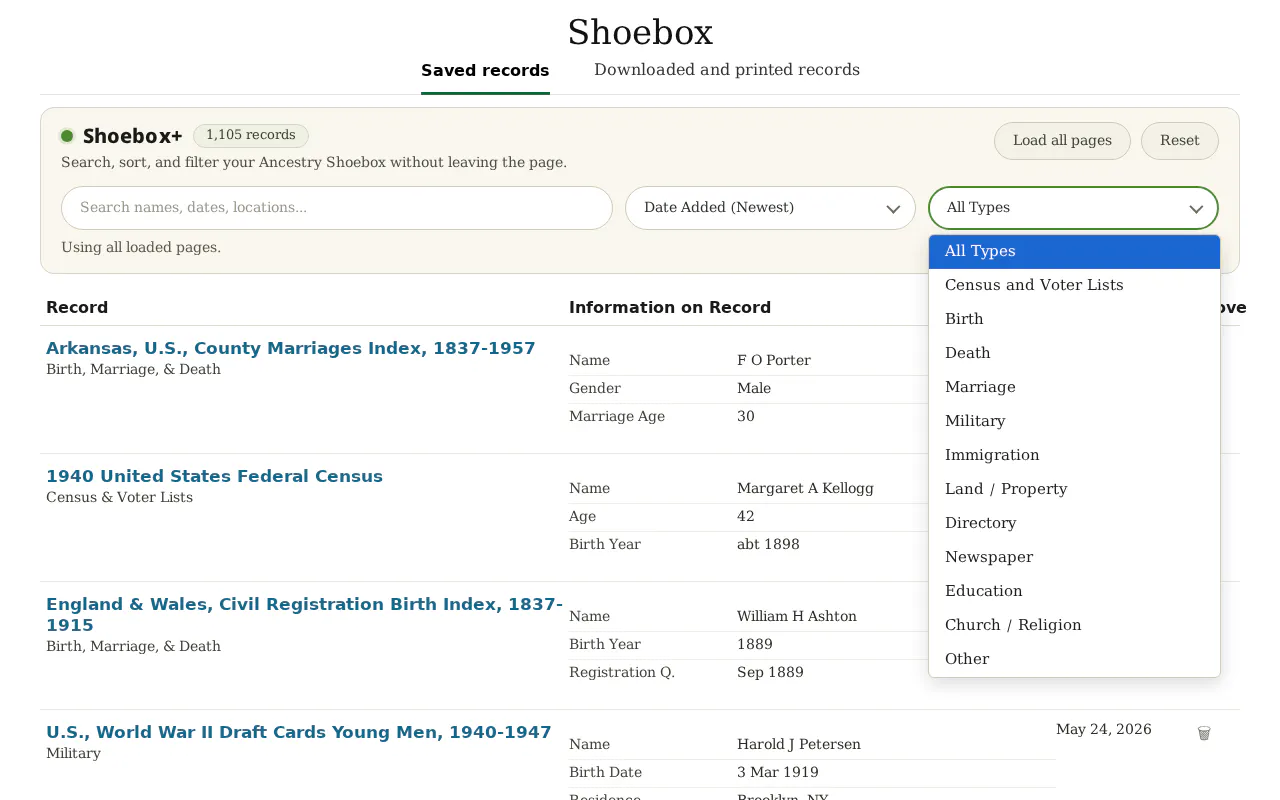
Shoebox Plus Organizer
Finally search, sort, and filter your Ancestry Shoebox
Detailed Feature Comparison Matrix
Compare Other Tools| Dimension | Shoebox Plus Organizer |  SMASH Voice to Invoice SMASH Voice to Invoice |
|---|---|---|
| Primary Category | Chrome Extensions | Chrome Extensions |
| Community Rating | No ratings(0 reviews) | No ratings(0 reviews) |
| Community Upvotes | 5 votes | 71 votes |
| Supported Platforms | WebChrome Extension | Web |
| Tags & Focus | #Chrome Extensions#Productivity#Family | #Chrome Extensions#Tech#OpenAI Day#Productivity#Accounting |
| Maker / Company | Independent Developer | Independent Developer |
| Platform Verification | Community Listing | Community Listing |
About Shoebox Plus Organizer
Shoebox Plus Organizer is a dedicated Chrome extension designed to solve a long-standing request for Ancestry users: a way to effectively search, sort, and filter their Ancestry Shoebox.
Built by Shannon Christmas, this tool empowers genealogists and family history enthusiasts to load every page of their Shoebox in a single click. Once loaded, users can seamlessly find any saved record by name, date, or place.
Designed with privacy and global accessibility in mind, the tool operates 100% on-device and supports all 11 international Ancestry sites across 6 languages. It is available via a straightforward pricing model featuring a $25 one-time fee for a lifetime license with no ongoing subscriptions, backed by a 14-day money-back guarantee.
Pros of Shoebox Plus Organizer
- Enables users to finally search, sort, and filter their Ancestry Shoebox
- Load every page in just one click
- Find any record by name, date, or place
- Works across all 11 international Ancestry sites in 6 languages
- 100% on-device processing for privacy
- Simple one-time fee with no subscription model
Cons of Shoebox Plus Organizer
- Requires Google Chrome to use the extension
- One-time lifetime license fee of $25 (no free tier mentioned)
- Limited specifically to the Ancestry platform Shoebox
Frequently Asked Questions
What is Shoebox Plus Organizer?
Shoebox Plus Organizer is a Chrome extension that allows Ancestry users to search, sort, and filter records inside their Ancestry.com Shoebox.
How much does Shoebox Plus Organizer cost?
It is available for a $25 one-time fee for a lifetime license with no subscription required, and includes a 14-day money-back guarantee.
Does it work internationally?
Yes, it works across all 11 international Ancestry sites in 6 different languages.
Is my data secure?
Yes, the tool operates 100% on-device.
About SMASH Voice to Invoice
SMASH Voice to Invoice is an AI-powered productivity tool designed to help contractors, freelancers, and service professionals build and send quotes as fast as they can talk. Created out of the real-world frustration of losing jobs to faster competitors while trying to remember rates and manually type quotes, SMASH eliminates the friction of administrative work.
By leveraging voice recognition, users can simply talk out the details of a job directly into their phone while still on-site. The tool intelligently pulls from your custom pricing to generate accurate quotes instantly. This eliminates context-switching, guessing rates, and delays, allowing you to secure customer approval on the spot, get paid, and keep moving.
SMASH is available as a free download on the App Store and includes a Chrome extension, offering full-featured functionality with a generous tier of five free quotes per month.
Pros of SMASH Voice to Invoice
- Build and send quotes instantly using your voice while still on-site
- Pulls directly from your own custom pricing to ensure accurate rates
- Available on mobile via the App Store and on desktop via a Chrome extension
- Free tier includes 5 fully featured quotes per month
Cons of SMASH Voice to Invoice
- Limited to five free quotes per month on the free plan
- Requires internet access and voice input capabilities
- May require initial setup of custom pricing to ensure accurate voice-to-quote mapping
Frequently Asked Questions
What is SMASH Voice to Invoice?
SMASH Voice to Invoice is a productivity tool that lets you create and send professional quotes using your voice. It pulls from your custom pricing to generate accurate quotes instantly while you are still on-site with a customer.
How much does SMASH Voice to Invoice cost?
SMASH is free to use on the App Store and via its Chrome extension, offering five full-featured quotes per month for free.
Where can I use SMASH Voice to Invoice?
SMASH is available as a mobile application on the App Store and as a Chrome extension for desktop workflows.