
Nom vs Hamburger Menu CSS Gallery
Comprehensive feature analysis, ratings breakdown, platform compatibility, and community review comparison.

Nom
Give AI agents real UI powers without giving up control.
Detailed Feature Comparison Matrix
Compare Other Tools| Dimension | Nom | 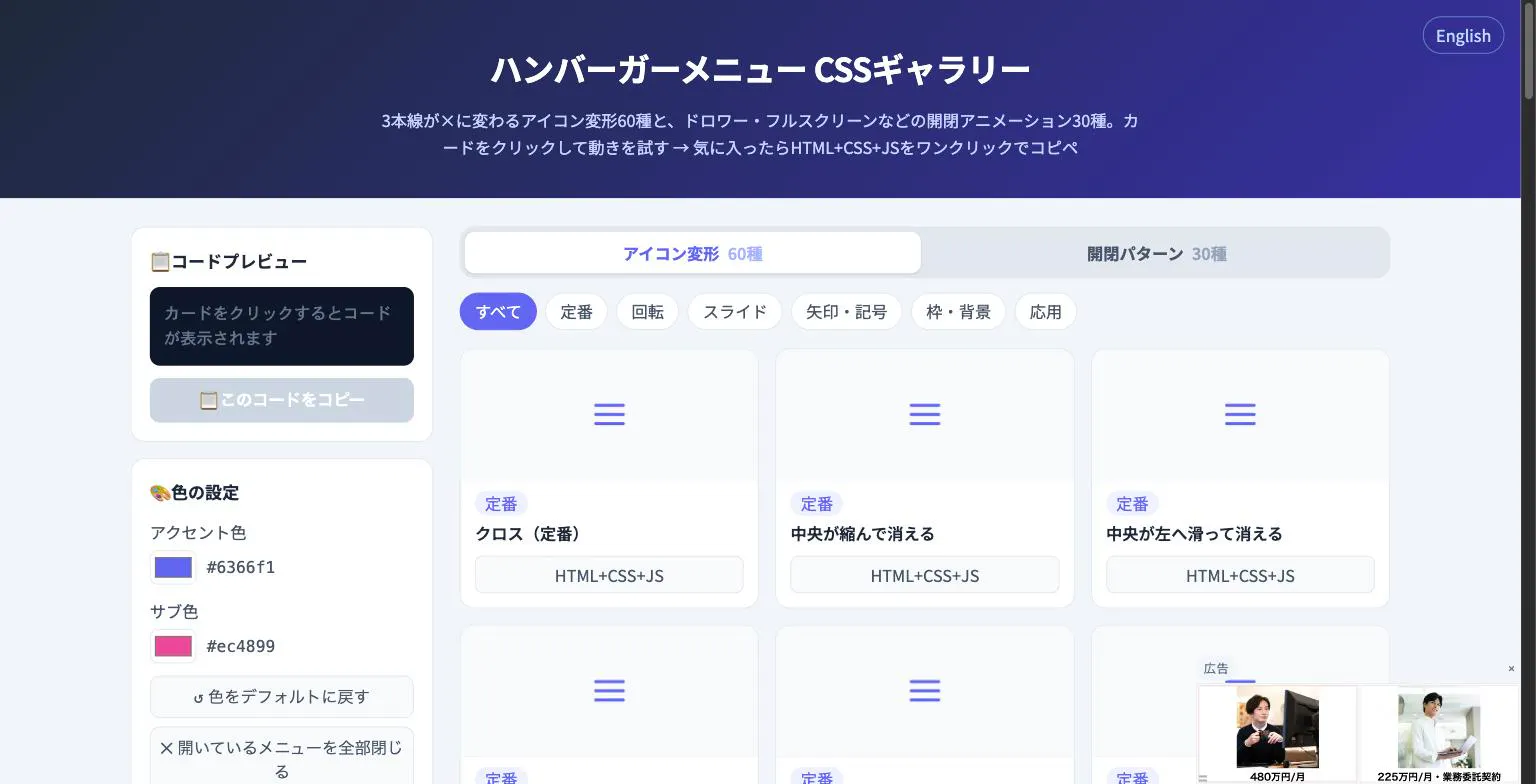 Hamburger Menu CSS Gallery Hamburger Menu CSS Gallery |
|---|---|---|
| Primary Category | Design Tools | Design Tools |
| Community Rating | No ratings(0 reviews) | No ratings(0 reviews) |
| Community Upvotes | 6 votes | 5 votes |
| Supported Platforms | Web | Web |
| Tags & Focus | #Developer Tools#Open Source#GitHub#Design Tools | #Developer Tools#Design Tools |
| Maker / Company | Independent Developer | Independent Developer |
| Platform Verification | Community Listing | Community Listing |
About Nom
Nom is an open-source developer tool designed to bridge the gap between AI agents and application interfaces. It allows developers to give AI agents real UI capabilities by connecting AI tool calls directly to existing React components without sacrificing control over the application.
By defining agent capabilities with typed, validated tools, Nom enables you to map AI outputs directly into React component props. This architecture ensures that your application remains in full control of critical operations like data fetching, user authorization, and rendering logic.
Key features and benefits of Nom include:
- Model-Provider Neutral: Works across different AI model providers and integrates seamlessly with AI SDK 6.
- Built-in State Handling: Out-of-the-box support for essential UI states, including loading, empty, error, and stale-request states.
- Familiar UI Integration: Enables the creation of AI-powered dashboards, product search features, and interactive interfaces using the React components your users already know.
Pros of Nom
- Connects AI tool calls directly to existing React components
- Model-provider neutral and compatible with AI SDK 6
- Keeps the application in control of data fetching, authorization, and rendering
- Built-in handling for loading, empty, error, and stale-request states
- Open-source and customizable for React developers
Cons of Nom
- Specifically designed for React applications, limiting use with other UI frameworks
- Requires existing component setups and development effort to integrate
Frequently Asked Questions
What is Nom?
Nom is an open-source developer tool that links AI tool calls to existing React components in your application, allowing AI agents to trigger UI updates while preserving application control over data, auth, and rendering.
Is Nom tied to a specific AI model provider?
No, Nom is model-provider neutral and works with AI SDK 6.
How does Nom handle different UI states?
Nom includes built-in support for loading, empty, error, and stale-request states out of the box.
What can I build using Nom?
You can use Nom to build interactive interfaces, AI-powered dashboards, and product search features using the React components already in your codebase.
About Hamburger Menu CSS Gallery
Hamburger Menu CSS Gallery is a specialized developer and design tool created to simplify the implementation of navigation toggles. It features a curated collection of 90 copy-paste CSS hamburger menu options, including 60 unique icon morph effects—such as standard three-line transformations into an X—and 30 open/close container animations like drawers, fullscreen overlays, and circular reveals.
Designed for efficiency, the platform allows users to test effects live directly in the browser. Developers can customize accent colors and copy the required HTML, CSS, and JavaScript with a single click. Best of all, the tool requires no external libraries and no sign-up process, making it an immediate, frictionless addition to any web developer's toolkit.
Pros of Hamburger Menu CSS Gallery
- Includes 90 total copy-paste CSS hamburger menu styles and toggle animations
- Offers 60 distinct icon morph effects and 30 open/close container animations
- Live in-browser preview with customizable accent colors
- Requires no external libraries or user registration/sign-up
Cons of Hamburger Menu CSS Gallery
- Focused exclusively on hamburger menus and toggle animations
- Limited information on advanced framework integrations based on available metadata
Frequently Asked Questions
What is Hamburger Menu CSS Gallery?
It is a developer and design tool featuring 90 copy-paste CSS hamburger menu options, split between 60 icon morph effects and 30 open/close toggle animations.
Do I need to sign up or use external libraries?
No sign-up is required, and the components do not rely on external libraries. You can preview everything live in the browser and copy the code with a single click.
What types of animations are included?
The gallery includes 60 icon morph effects (such as lines turning into an X) and 30 open/close animations including drawer, fullscreen, and circular reveal effects.