
Lottie Creator 2.0 vs Hamburger Menu CSS Gallery
Comprehensive feature analysis, ratings breakdown, platform compatibility, and community review comparison.
Detailed Feature Comparison Matrix
Compare Other Tools| Dimension |  Lottie Creator 2.0 Lottie Creator 2.0 | 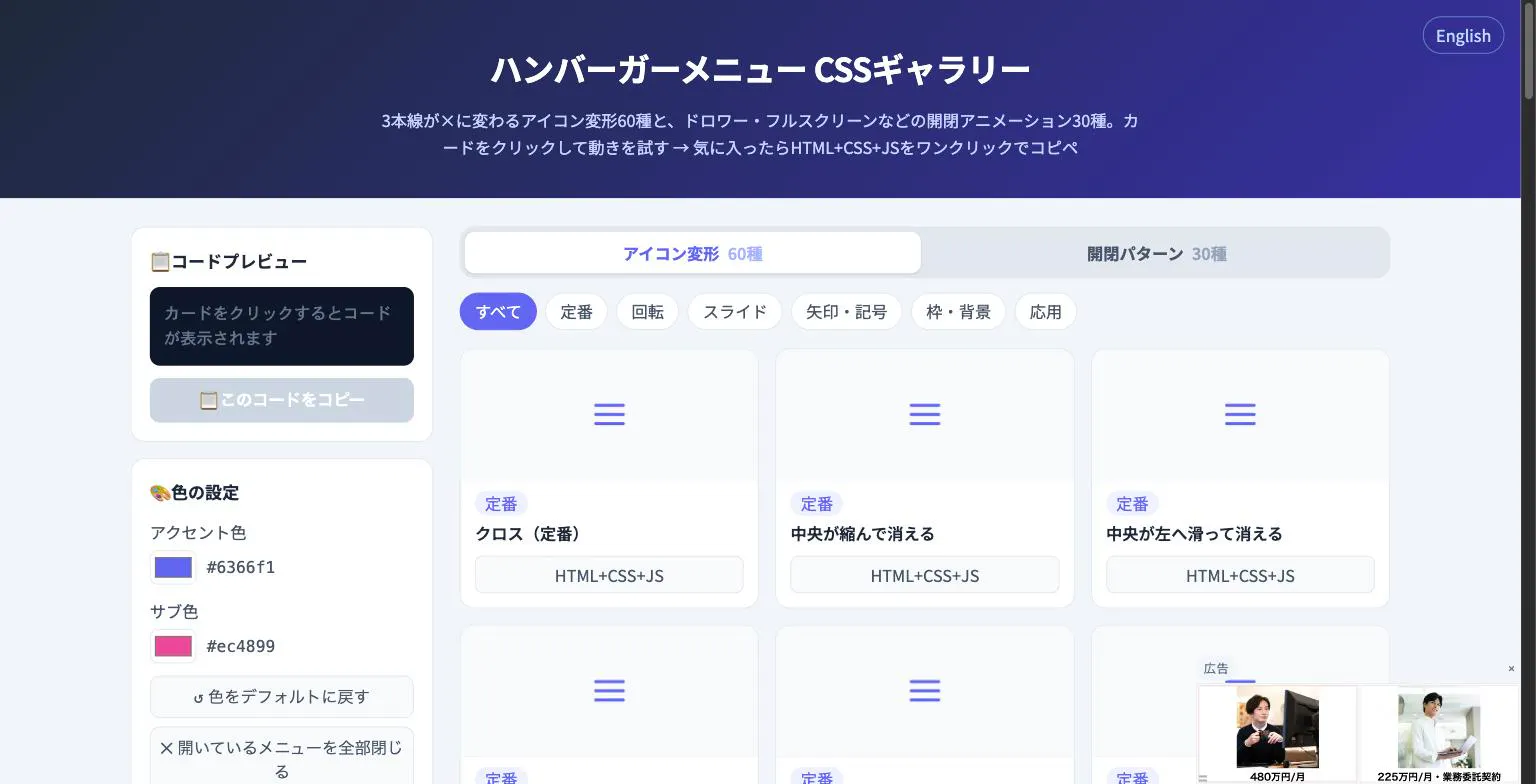 Hamburger Menu CSS Gallery Hamburger Menu CSS Gallery |
|---|---|---|
| Primary Category | Design Tools | Design Tools |
| Community Rating | 4.8(19 reviews) | No ratings(0 reviews) |
| Community Upvotes | 386 votes | 5 votes |
| Supported Platforms | Web | Web |
| Tags & Focus | #Design Tools#Animation#Graphics & Design | #Developer Tools#Design Tools |
| Maker / Company | Independent Developer | Independent Developer |
| Platform Verification | Community Listing | Community Listing |
About Lottie Creator 2.0
Welcome to our professional software review of Lottie Creator 2.0, boldly touted as "After Effects for the web." Built natively on Lottie, this browser-based design tool allows you to craft vector animations entirely from scratch without ever needing to open a heavy desktop application or worry about traditional developer handoff.
Lottie Creator 2.0 accelerates your design workflow using Motion Copilot AI, enabling you to move much faster when generating and modifying animations. Beyond static vector creation, the platform lets you wire up advanced interactivity utilizing State Machines, ensuring your animations respond dynamically. When you are finished, you can seamlessly export production-ready files in both Lottie and dotLottie formats directly from your web browser.
Pros of Lottie Creator 2.0
- Design vector animations entirely from scratch in your browser with no desktop app required
- Accelerate motion design workflows using integrated Motion Copilot AI
- Wire up complex interactivity easily using State Machines
- Export production-ready Lottie and dotLottie files with zero dev handoff friction
Cons of Lottie Creator 2.0
- Requires a reliable web browser and internet connection since it lacks a native desktop app
- May require adaptation for designers accustomed strictly to traditional desktop suites like Adobe After Effects
- Advanced state machine logic and AI features have a learning curve
Frequently Asked Questions
What is Lottie Creator 2.0?
Lottie Creator 2.0 is a browser-based vector animation tool—often described as After Effects for the web—built natively on Lottie. It allows users to design animations from scratch, use Motion Copilot AI, build interactivity with State Machines, and export production-ready Lottie and dotLottie files.
Do I need a desktop application to use Lottie Creator 2.0?
No, Lottie Creator 2.0 runs entirely in your browser with no desktop app required, eliminating traditional dev handoff bottlenecks.
What export formats are supported?
You can export production-ready Lottie and dotLottie files directly from the platform.
How does Motion Copilot AI help?
Motion Copilot AI helps you move faster during the animation creation and design process inside the browser.
About Hamburger Menu CSS Gallery
Hamburger Menu CSS Gallery is a specialized developer and design tool created to simplify the implementation of navigation toggles. It features a curated collection of 90 copy-paste CSS hamburger menu options, including 60 unique icon morph effects—such as standard three-line transformations into an X—and 30 open/close container animations like drawers, fullscreen overlays, and circular reveals.
Designed for efficiency, the platform allows users to test effects live directly in the browser. Developers can customize accent colors and copy the required HTML, CSS, and JavaScript with a single click. Best of all, the tool requires no external libraries and no sign-up process, making it an immediate, frictionless addition to any web developer's toolkit.
Pros of Hamburger Menu CSS Gallery
- Includes 90 total copy-paste CSS hamburger menu styles and toggle animations
- Offers 60 distinct icon morph effects and 30 open/close container animations
- Live in-browser preview with customizable accent colors
- Requires no external libraries or user registration/sign-up
Cons of Hamburger Menu CSS Gallery
- Focused exclusively on hamburger menus and toggle animations
- Limited information on advanced framework integrations based on available metadata
Frequently Asked Questions
What is Hamburger Menu CSS Gallery?
It is a developer and design tool featuring 90 copy-paste CSS hamburger menu options, split between 60 icon morph effects and 30 open/close toggle animations.
Do I need to sign up or use external libraries?
No sign-up is required, and the components do not rely on external libraries. You can preview everything live in the browser and copy the code with a single click.
What types of animations are included?
The gallery includes 60 icon morph effects (such as lines turning into an X) and 30 open/close animations including drawer, fullscreen, and circular reveal effects.