
Hyper vs Hamburger Menu CSS Gallery
Comprehensive feature analysis, ratings breakdown, platform compatibility, and community review comparison.
Detailed Feature Comparison Matrix
Compare Other Tools| Dimension |  Hyper | 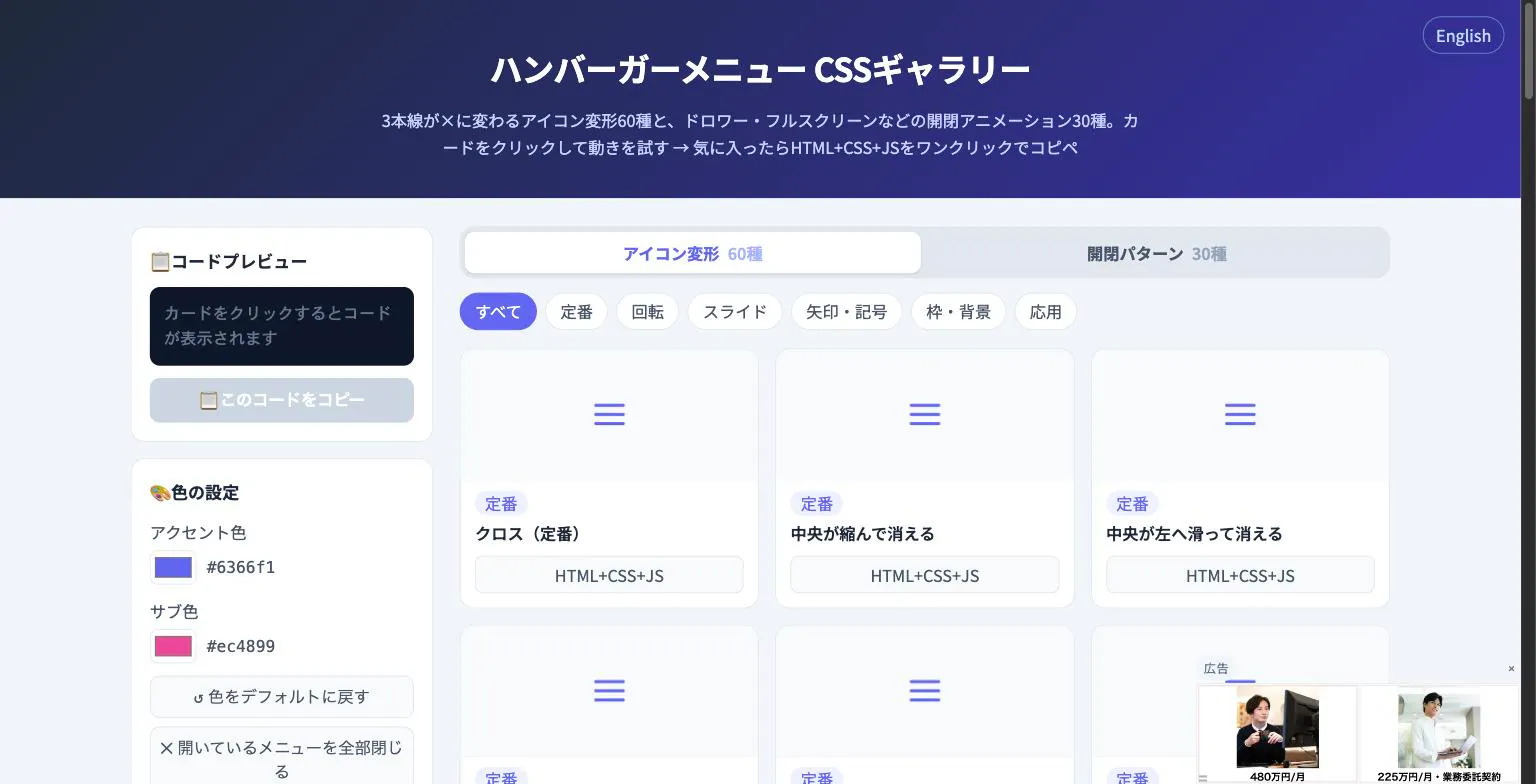 Hamburger Menu CSS Gallery |
|---|---|---|
| Primary Category | Design Tools | Design Tools |
| Community Rating | 5.0(2 reviews) | No ratings(0 reviews) |
| Community Upvotes | 6 votes | 5 votes |
| Supported Platforms | Web | Web |
| Tags & Focus | #Artificial Intelligence#Developer Tools#Design Tools | #Developer Tools#Design Tools |
| Maker / Company | Independent Developer | Independent Developer |
| Platform Verification | Community Listing | Community Listing |
About Hyper
Hyper, developed by ASI Flow, is an autonomous AI coding agent designed to streamline software development workflows directly within real GitHub repositories. Rather than acting merely as a code completion tool, Hyper autonomously handles complex, multi-step engineering tasks—from initial planning and writing code to running tests and submitting pull requests (PRs).
Built with transparency, control, and security at its core, Hyper offers full visibility into its decision-making process by streaming every thought, tool call, and cost metric in real time. It ensures budget safety through hard spend caps and provides secure, isolated execution via sandboxed environments. Furthermore, Hyper prioritizes codebase privacy by promising that your proprietary code is never used for model training.
Pros of Hyper
- Autonomous end-to-end task execution: plans, codes, tests, and opens GitHub PRs
- Real-time transparency streaming thoughts, tool calls, and spend down to the cent
- Enhanced budget control with enforceable hard spend caps
- Sandboxed execution environment for safe code running
- Privacy guarantee: your code is not used for AI model training
- Available to start for free
Cons of Hyper
- Specifically built for GitHub, which may limit teams using other version control providers
- Full detailed paid plan pricing tiers are not fully detailed in the high-level metadata
Frequently Asked Questions
What is Hyper by ASI Flow?
Hyper is an autonomous AI developer tool that plans, writes code, runs tests, and automatically opens pull requests directly in real GitHub repositories.
How does Hyper track costs?
Hyper streams exact execution costs in real time down to the cent and allows users to set hard spend caps to avoid unexpected charges.
Is my repository code safe with Hyper?
Yes. Hyper executes code within isolated, sandboxed environments and guarantees that your code is not used to train AI models.
Can I monitor Hyper's thought process?
Yes, Hyper streams every thought, tool call, and action in real time, providing complete auditability over what the AI agent is doing.
Does Hyper offer a free option?
Yes, Hyper allows users to start using the platform for free.
About Hamburger Menu CSS Gallery
Hamburger Menu CSS Gallery is a specialized developer and design tool created to simplify the implementation of navigation toggles. It features a curated collection of 90 copy-paste CSS hamburger menu options, including 60 unique icon morph effects—such as standard three-line transformations into an X—and 30 open/close container animations like drawers, fullscreen overlays, and circular reveals.
Designed for efficiency, the platform allows users to test effects live directly in the browser. Developers can customize accent colors and copy the required HTML, CSS, and JavaScript with a single click. Best of all, the tool requires no external libraries and no sign-up process, making it an immediate, frictionless addition to any web developer's toolkit.
Pros of Hamburger Menu CSS Gallery
- Includes 90 total copy-paste CSS hamburger menu styles and toggle animations
- Offers 60 distinct icon morph effects and 30 open/close container animations
- Live in-browser preview with customizable accent colors
- Requires no external libraries or user registration/sign-up
Cons of Hamburger Menu CSS Gallery
- Focused exclusively on hamburger menus and toggle animations
- Limited information on advanced framework integrations based on available metadata
Frequently Asked Questions
What is Hamburger Menu CSS Gallery?
It is a developer and design tool featuring 90 copy-paste CSS hamburger menu options, split between 60 icon morph effects and 30 open/close toggle animations.
Do I need to sign up or use external libraries?
No sign-up is required, and the components do not rely on external libraries. You can preview everything live in the browser and copy the code with a single click.
What types of animations are included?
The gallery includes 60 icon morph effects (such as lines turning into an X) and 30 open/close animations including drawer, fullscreen, and circular reveal effects.