
FileFlippers vs Hamburger Menu CSS Gallery
Comprehensive feature analysis, ratings breakdown, platform compatibility, and community review comparison.
Detailed Feature Comparison Matrix
Compare Other Tools| Dimension |  FileFlippers | 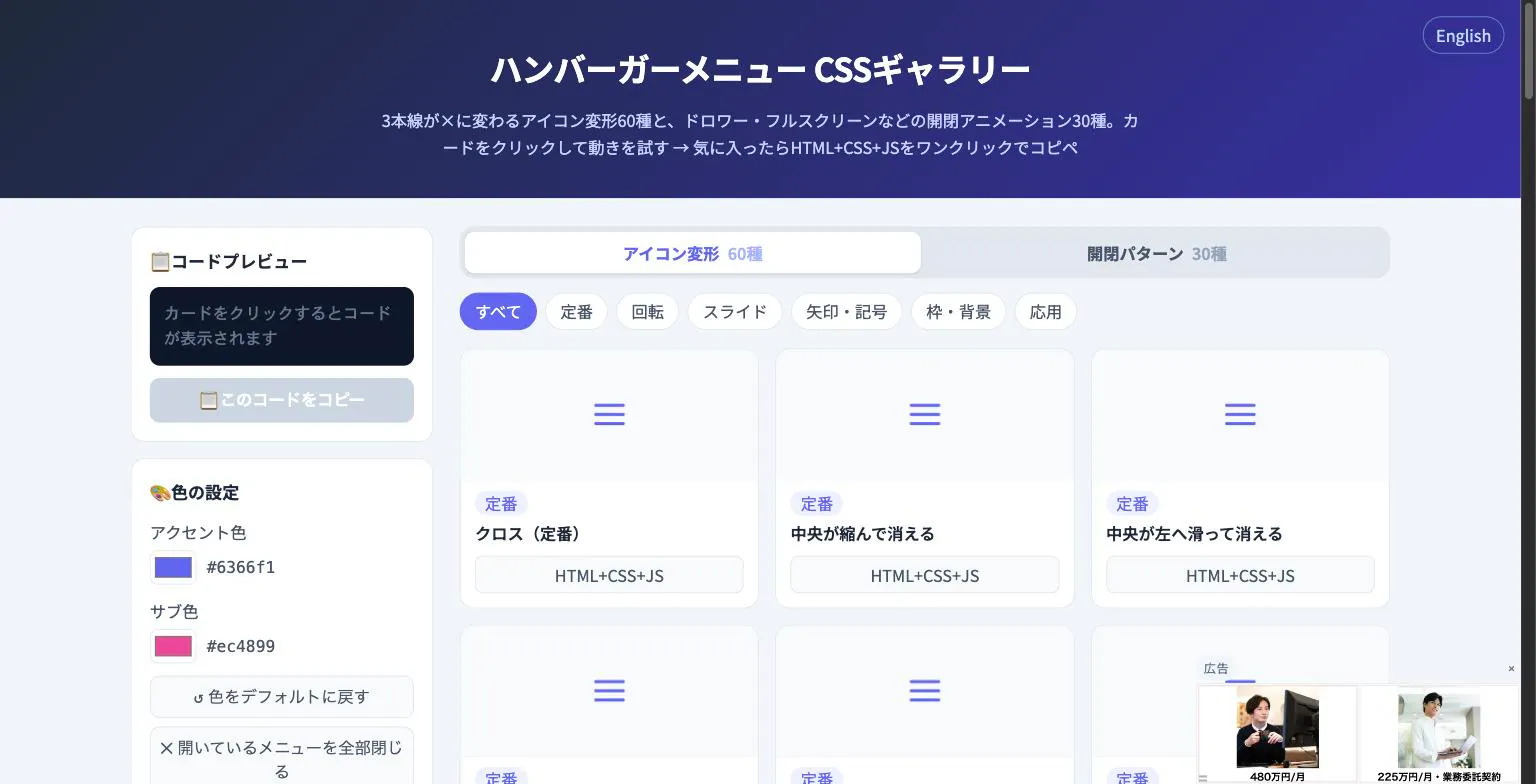 Hamburger Menu CSS Gallery |
|---|---|---|
| Primary Category | Design Tools | Design Tools |
| Community Rating | No ratings(0 reviews) | No ratings(0 reviews) |
| Community Upvotes | 65 votes | 5 votes |
| Supported Platforms | Web | Web |
| Tags & Focus | #Productivity#Design Tools#User Experience | #Developer Tools#Design Tools |
| Maker / Company | Independent Developer | Independent Developer |
| Platform Verification | Community Listing | Community Listing |
About FileFlippers
FileFlippers is an all-in-one file delivery and monetization platform built specifically for freelancers and creative studios. Tired of traditional clunky transfer methods and the endless hassle of chasing invoices? FileFlippers offers a seamless workflow that combines fast, resumable large file uploads with integrated client payment gating.
With FileFlippers, you can send your work on custom-branded pages while maintaining complete professional control. The platform allows you to add security watermarks, collect client feedback directly, and keep different project versions organized and tidy. Once the final files are ready, you can gate them behind a payment wall, ensuring that the download automatically unlocks the exact moment you get paid.
Additionally, FileFlippers features built-in AI tools for enhancing and converting media, enabling you to upscale or reformat files without ever leaving your browser tab. Fast, secure, and fully branded, the platform even includes a free plan to help you streamline your creative business.
Pros of FileFlippers
- Gate final file downloads behind client payments to avoid chasing invoices
- Fast and resumable uploads for large files
- Custom-branded delivery pages for freelancers and studios
- Built-in AI features for file enhancement, upscaling, and format conversion
- Tools to add watermarks, manage version control, and collect client feedback
Cons of FileFlippers
- Specific advanced pricing details are not detailed beyond the availability of a free plan
- Niche-focused primarily on freelancers and studios needing file delivery and payment gating
Frequently Asked Questions
What is FileFlippers?
FileFlippers is a file delivery and monetization platform built for freelancers and studios. It combines large file transfers, branded client pages, watermarking, version control, client feedback collection, and payment gating so downloads unlock instantly upon payment.
How does payment gating work on FileFlippers?
You can gate your final deliverables behind a payment requirement. The client's download automatically unlocks the moment they complete their payment, helping you eliminate the hassle of chasing invoices.
Does FileFlippers include AI features?
Yes, FileFlippers comes with built-in AI enhancement and conversion tools, allowing you to upscale images or reformat files directly within your browser tab.
Is there a free plan available?
Yes, a free plan is available for users looking to get started with the platform.
About Hamburger Menu CSS Gallery
Hamburger Menu CSS Gallery is a specialized developer and design tool created to simplify the implementation of navigation toggles. It features a curated collection of 90 copy-paste CSS hamburger menu options, including 60 unique icon morph effects—such as standard three-line transformations into an X—and 30 open/close container animations like drawers, fullscreen overlays, and circular reveals.
Designed for efficiency, the platform allows users to test effects live directly in the browser. Developers can customize accent colors and copy the required HTML, CSS, and JavaScript with a single click. Best of all, the tool requires no external libraries and no sign-up process, making it an immediate, frictionless addition to any web developer's toolkit.
Pros of Hamburger Menu CSS Gallery
- Includes 90 total copy-paste CSS hamburger menu styles and toggle animations
- Offers 60 distinct icon morph effects and 30 open/close container animations
- Live in-browser preview with customizable accent colors
- Requires no external libraries or user registration/sign-up
Cons of Hamburger Menu CSS Gallery
- Focused exclusively on hamburger menus and toggle animations
- Limited information on advanced framework integrations based on available metadata
Frequently Asked Questions
What is Hamburger Menu CSS Gallery?
It is a developer and design tool featuring 90 copy-paste CSS hamburger menu options, split between 60 icon morph effects and 30 open/close toggle animations.
Do I need to sign up or use external libraries?
No sign-up is required, and the components do not rely on external libraries. You can preview everything live in the browser and copy the code with a single click.
What types of animations are included?
The gallery includes 60 icon morph effects (such as lines turning into an X) and 30 open/close animations including drawer, fullscreen, and circular reveal effects.